The General Practice in Aged Care Incentive (GPACI) program commenced in July 2024, offering incentive payments to general practices and practitioners for providing care to permanent residents living in residential aged care homes.
Eligible general practitioners (referred to as Responsible Providers) and practices registered in MyMedicare and the GPACI receive incentive amounts for providing regular visits and care planning to their registered patients living in residential aged care homes.
The incentive supports GPs and practices to deliver more proactive, planned and continuous care and is an important part of the Australian Government’s response to the Royal Commission into Quality and Safety in Aged Care and Strengthening Medicare.
Services Australia published guidance for general practices on using PRODA and HPOS to register for participation in the MyMedicare General Practice in Aged Care Incentive, including how to link Responsible Providers and patients.
This information outlines the steps required to add the MyMedicare General Practice in Aged Care Incentive and provides practical support for practices completing the registration process.
For further information, please refer to the Department of Health, Disability and Ageing website.
To register your practice:
Gippsland PHN has produced a comprehensive step-by-step guide to help you through the registration process
For practices already registered, the guide provides helpful ways to maintain your MyMedicare. For those yet to register, it is a how-to guide with Gippsland PHN providing one-on-one support should you need it.
For residents of aged care homes to receive services under the General Practice in Aged Care Incentive, they will first need to be registered with their chosen practice in MyMedicare.
If your practice is considering the practicalities of how to obtain consent for MyMedicare registration for patients living in an aged care home, options include:
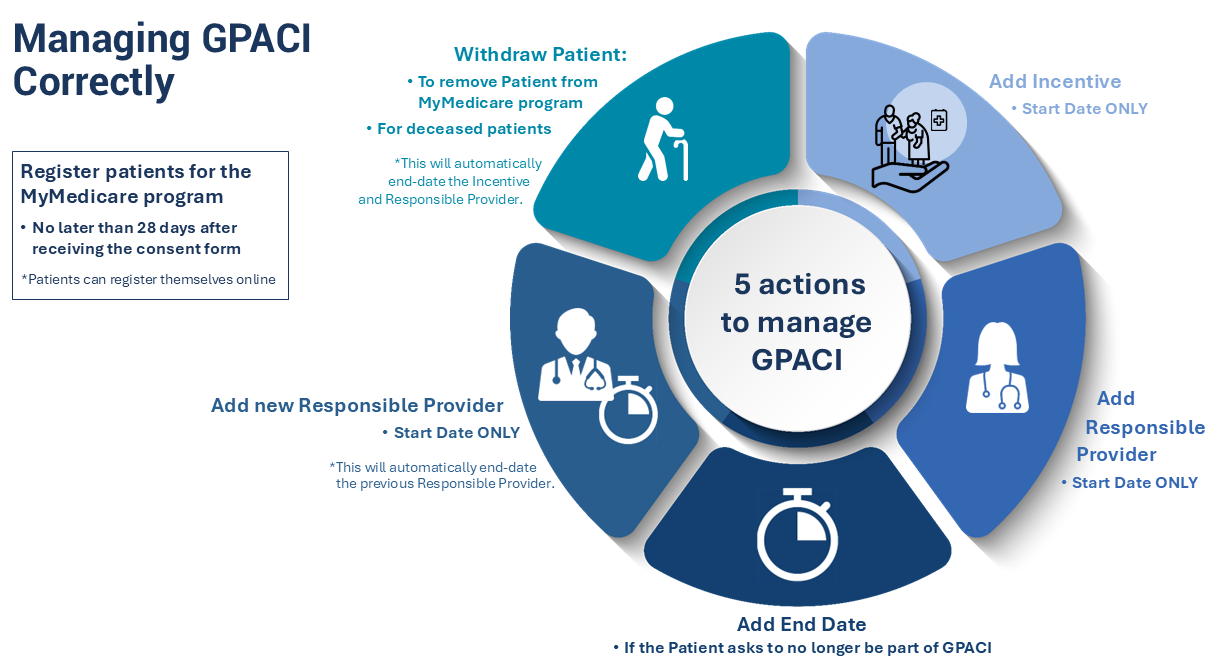
Once registered in MyMedicare, you can add the General Practice in Aged Care Incentive indicator to your patients’ MyMedicare profile (see page 27 of Managing patient registrations).
Important: MyMedicare registration is voluntary for patients and practices. Patients are not automatically linked to your practice, nor can they be added without their initiation and/or consent. Registration for MyMedicare should only be completed in HPOS for patients who have initiated the registration process and/or completed and signed the Registration Form.
The servicing requirements for the incentive for each patient are:
For the list of eligible services and MBS items for GPACI see: MYMEDINFO13-Eligible MBS/DVA service items for the MyMedicare General Practice in Aged Care Incentive.
The forecasting tool in Health Professionals Online Services (HPOS) allows practices and providers to track whether the General Practice in Aged Care Incentive (GPACI) requirements have been met for each patient.
If performed prior to the end of each quarter, this allows practices to highlight and schedule any outstanding patient regular visits and/or care planning services to ensure the incentive servicing requirements are met.
Services Australia resources:

Puffin has been added to the POLAR data extraction and analysis platform specifically to support general practices to successfully manage requirements of the General Practice in Aged Care Incentive (GPACI).
GPs and practices can easily ensure they comply with GPACI requirements through an interactive dashboard to help track and report on services offered to residents of Aged Care Homes.
Puffin also offers methods for GPs to monitor the status of selected vaccinations for older patients.
Eligible general practices can access the GPACI if they are registered with MyMedicare and meet the General Practice in Aged Care Incentive eligibility and servicing requirements.
Aged care home patients must be also registered with MyMedicare and identified by the responsible GP and practice to participate in the incentive.
Payments are:
The payments are quarterly, in addition to existing Medicare Benefits Scheme (MBS) and Department of Veterans’ Affairs (DVA) rebates for services delivered.
Rural loadings will apply to the responsible GP and practice incentive payments for Modified Monash Model (MMM) regions MMM 3 to MMM 7.
Also see MyMedicare How To: Manage the General Practice in Aged Care Incentive Fact Sheet (PDF)